

Tech 9 min read
Money transfer app development: how to choose between build, white-label and rebuild
Money transfer app development, decided properly: the 8 app states, must-have features, build vs white-label vs rebuild, cost drivers and vendor questions.
On this page
Quick answer
Money transfer app development means designing and shipping the mobile flow a sender uses to register, pass KYC, get a quote, add a beneficiary, fund, send, track and repeat a transfer. Operators have 3 routes: build a custom app, license a white-label app, or rebuild the one they have. The right route depends on the platform underneath, the send flow and who owns the code.
Key takeaways
- Every remittance app has to handle 8 states, from registration to the repeat transfer.
- Custom builds give the most control, white-label gives the fastest start, and rebuilds protect senders you already have.
- A first custom version typically takes 3 weeks of scoping and 16 to 24 weeks of build, before store review.
- Integrations with KYC, payment and payout partners drive most of the timeline and most of the cost.
- Many operators do not need a new app at all; they need the quote and KYC steps fixed.
"We need an app, but we do not know whether to build it, license it or fix the one we have." That is where most app conversations with founders and product leads start. Each route looks cheaper from a different angle, and the sales pitch for each one sounds convincing on its own.
Money transfer app development is a decision before it is a project. This guide gives you the states every app must handle, the features that matter, an honest comparison of the 3 routes, the factors that drive cost, and the questions to put to any vendor, including us.
What money transfer app development must cover: the 8 app states
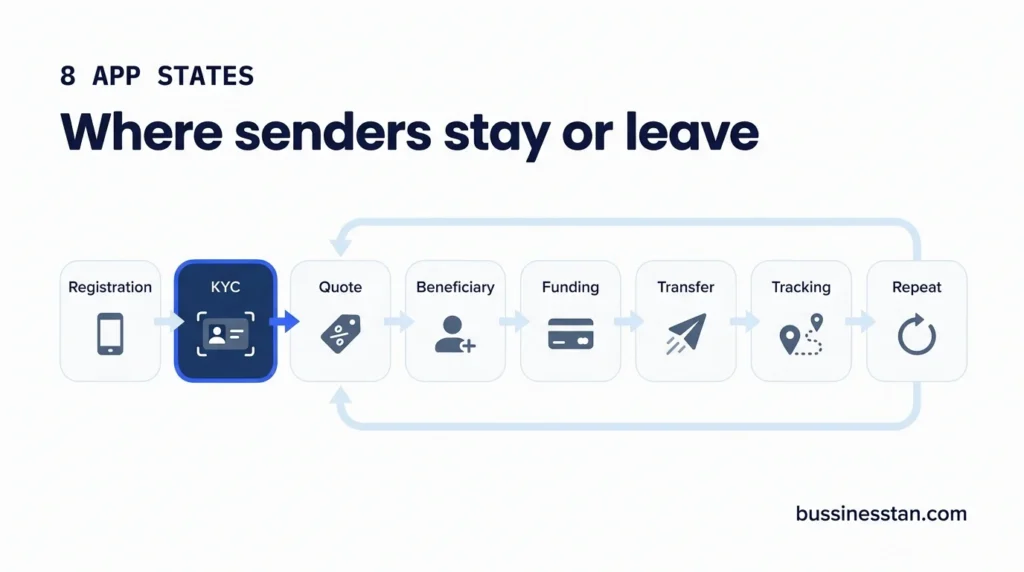
A remittance app is not a set of screens. It is 8 states a sender moves through, and each one either holds them or loses them.
| # | State | What the sender needs | Event to log |
|---|---|---|---|
| 1 | Registration | A short sign-up by phone or email with OTP | Registration completed |
| 2 | KYC | Clear document and selfie capture that works on older handsets | KYC started, submitted, referred, passed |
| 3 | Quote | Send amount, receive amount, rate, fee and total on the first screen | Quote created |
| 4 | Beneficiary | Bank, mobile wallet or cash pickup details saved once | Beneficiary added |
| 5 | Funding | A payment method that works in the send country | Payment selected |
| 6 | Transfer | A confirmation that matches the quote | Transfer initiated |
| 7 | Tracking | Plain status updates the sender can share with family | Transfer completed |
| 8 | Repeat transfer | A 2-tap send to a saved beneficiary | First and repeat transfer |
If a quote sits 4 screens deep, the sender goes back to the agent counter. If the event map is added after launch, nobody can say where they went.
Must-have features for remittance app development
The exact feature set depends on your operating model, licences, banking relationships and payment providers. Most remittance app development projects still need this core list:
- Sender registration: phone, OTP and multi-factor authentication.
- KYC integration: document, selfie and address capture through your chosen provider, with retry states that explain what went wrong.
- Quote experience: live rate and fee, matched to what checkout charges.
- Saved beneficiaries: bank account, mobile wallet and cash pickup.
- Funding methods: card, bank transfer or open banking, depending on the send market and your partners.
- Transfer tracking: states the sender can read without calling support.
- Push and rate alerts: set by the sender, not sent to everyone.
- Referral codes and deep links: tracked through to the first transfer.
- Analytics SDKs: Firebase or GA4 plus your MMP, with the same event names as the website.
- Agent features, where relevant: a locator and branch details for agent-led operators.
Security features such as biometrics, session management and device checks belong in the build. Compliance decisions stay with the regulated business.
Licensing and AML questions go to a qualified adviser. We handle advertising and marketing compliance.
Build, white-label or rebuild: the trade-offs
| Factor | Custom build | White-label app | Rebuild or redesign |
|---|---|---|---|
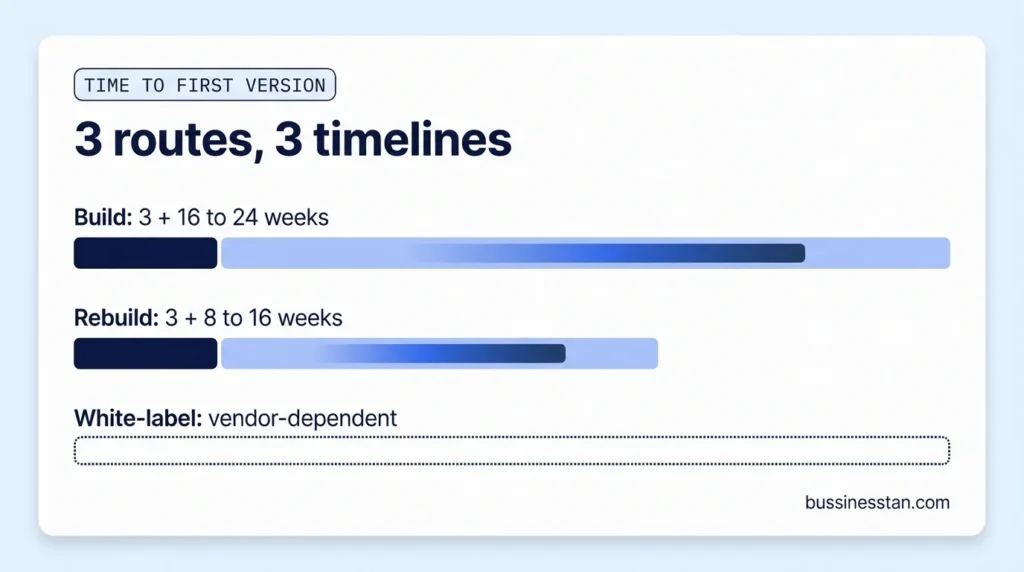
| Time to a first version | 3 weeks scoping, then 16 to 24 weeks build | Vendor-dependent, often shorter because core flows exist | 3 weeks audit, then 8 to 16 weeks |
| Control of the send flow | Full | Limited to what the vendor exposes | Full, within the existing codebase |
| Main cost drivers | Integrations, platforms, feature scope | Licence terms, per-transfer or per-user fees, customisation limits | Scope of screens changed, state of the old code |
| Lock-in | Low if you own the code | High: flows, data and roadmap sit with the vendor | Low if you own the code |
| Risk to existing senders | None, if there is no app yet | Migration risk if replacing an app | KYC and payment completion can drop if the flow is reshuffled |
| Best when | The send flow is your differentiator | Speed to market matters most and the vendor's platform fits | Senders exist and the funnel shows specific leaks |
When a white label remittance app makes sense
A white label remittance app suits a new operator that needs to be live quickly and whose advantage sits in pricing, corridors or distribution rather than the app itself. Read the contract for data export, corridor limits and what happens when you leave.
When custom remittance app development makes sense
Custom remittance app development suits operators whose send flow is part of the proposition, who plan several corridors and payout methods, or who need the app to share events and states with their own platform and CRM.
When to rebuild, or only redesign
If you already have senders, measure before you touch anything. Most apps need the quote and the error states fixed, not a new design system. That work costs less and puts fewer senders at risk.
The 5-question app decision
- Is the platform underneath settled? If not, decide that first. Our guide to build or buy: choosing an RMS covers it.
- Where is your differentiation? In the send flow points to build. In price or reach points to white-label.
- Do you have live senders today? Yes points to rebuild or redesign, measured against a baseline.
- Who owns the code and the roadmap? If the answer must be you, white-label is a weak fit.
- How many corridors and payout methods in 18 months? Many suggests corridors should be configuration, not code.
Fintech app development cost factors, without the price tag
We do not publish app prices, and a single figure means little without your integration list. These are the fintech app development cost factors that move the budget most:
| Cost driver | Why it moves the budget |
|---|---|
| KYC, payment and payout integrations | Each provider has its own API, test environment and edge cases; integrations drive most of the timeline |
| Platforms | Native iOS and Android, or one cross-platform codebase |
| Funding methods | Each method adds flows, failure states and reconciliation needs |
| Corridors and payout methods | Cheap if handled as configuration, expensive if hard-coded |
| Agent-led features | Locators, branch data and agent codes add scope |
| Languages | Fee and rate screens need human translation, not machine output |
| Event map and analytics | Cheaper before the build than after it |
| Release process | Store submission, phased releases and rollback plans |
Our mobile app development service covers new builds with the event map written before any code. Where an app already exists, app redesign and rebuild starts with a funnel baseline and leaves KYC rules alone.
What to ask any vendor before you sign
Put these questions to every shortlisted vendor, in writing:
- Who owns the code, and from which point?
- Which KYC, payment and payout providers are already integrated, and in which corridors are they live?
- Is a new corridor a configuration change or a development project?
- Which events ship by default, and can they reach our MMP and CRM under the same names?
- How often do releases go out, and who handles store submission?
- How do the rate and fee on the quote screen stay matched to checkout?
- What can we export if we leave, and in what format?
- Which compliance features exist in the product, and which remain our responsibility?
If the app needs to sit on a platform that handles reconciliation, payout routing and agents, the remittance management system is where that work happens. The events you define here should also feed your CRM; our guide to CRM for money transfer companies covers the data model, and activation emails for verified senders shows what to do with the "verified, never sent" state.
Frequently asked questions
How long does money transfer app development take?
For a custom first version, plan on about 3 weeks of scoping and 16 to 24 weeks of build and testing, with store review usually adding around a week. Integrations with KYC, payment and payout providers are the biggest variable, so the timeline firms up once that list is fixed.
Is a white label remittance app cheaper?
Often cheaper to start, not always cheaper to run. Licence and usage fees continue for as long as you use it, and control over the send flow, data and roadmap stays partly with the vendor. Compare total cost over several years, including the cost of leaving.
What drives remittance app development cost?
Integrations first: each KYC, payment and payout provider adds work. After that, the number of platforms, funding methods, corridors handled as code rather than configuration, agent features, languages and the release process. A useful quote needs your integration list before it can be accurate.
Should we rebuild our app or redesign the send flow?
Measure first. Set a baseline for registration, KYC, transfer completion and repeat send, then look at where senders leave. If the leaks sit in the quote and error states, redesign those screens. A full rebuild is justified when the code itself blocks releases or new corridors.
Who should own the code in custom remittance app development?
You should, from the first commit. Ownership lets you change teams, bring development in-house or add corridors without renegotiating. Ask for it in the contract, along with documentation and access to the build and release pipeline.
Where to start
Write down your platform, your live senders, your corridors for the next 18 months and your integration list. Those 4 facts usually decide the route before any vendor meeting.
If you want an outside view before committing a budget, Book a Growth Audit. In 14 days and for a fixed fee, it maps where senders drop between install and first transfer, so you know whether you need a new app, a redesign or neither.

Written by
Founder & CEO, Bussinesstan
Owns the commercial side of every engagement: fixed-fee scoping, corridor economics, and the reporting that ties spend to completed first transfers rather than to installs.
Meet the team
Remittance software: what your platform must do before marketing can scale
Remittance software checklist: 9 capabilities your platform needs, from corridor rules to reconciliation and marketing events, before you scale spend.

What are cross-border payments? A plain guide for remittance operators
What are cross border payments, how they work and which rails move the money: a plain guide for remittance operators on speed, price, payout and trust.
Remittance growth audit: what you get in 14 days, and when you do not need one
A remittance growth audit in 14 days: 4 areas, 4 deliverables you keep, a fixed fee quoted in writing, and an honest list of when to wait instead.