

SEO 9 min read
App store optimization for fintech apps: from remittance listing to first transfer
App store optimization for fintech apps, built for remittance: keyword fields, screenshots, localised listings and reviews measured to first transfer.
On this page
Quick answer
App store optimization for fintech apps is the work of improving an app's store listing (title, subtitle, keywords, screenshots, localisation, ratings and reviews) so the right people find it, install it and go on to use it. For a remittance app, success is measured past the install, on verified senders and funded first transfers by corridor, not on store impressions alone.
Key takeaways
- A remittance app listing is a conversion surface, so judge it on verified senders and first transfers, not installs.
- The title, subtitle and keyword field should carry corridor and payout terms, within each store's character limits.
- The first 3 screenshots should answer fee, speed and payout method before a sender scrolls.
- Localise by receive country and use custom product pages or custom store listings where demand justifies them.
- Ratings come from asking at the right moment, never from incentives, and review complaints belong in the product backlog.
Installs are flat and the listing has not changed in a year. The title is the brand name. The screenshots show empty app screens from 2 releases ago. Paid campaigns keep sending people to that page, and nobody owns it because product thinks it is marketing and marketing thinks it is product.
App store optimization for fintech apps fixes that ownership gap. For a money transfer app, the store listing is the last page a sender reads before the install, and often the first page they judge you on. It decides whether a sender searching "send money to Nigeria" picks you, and whether the person who installs is likely to clear KYC and fund a transfer.
This guide sets out the method we use for ASO for remittance apps, store by store, and how to measure it past the install.
Why a money transfer app store listing is a conversion surface
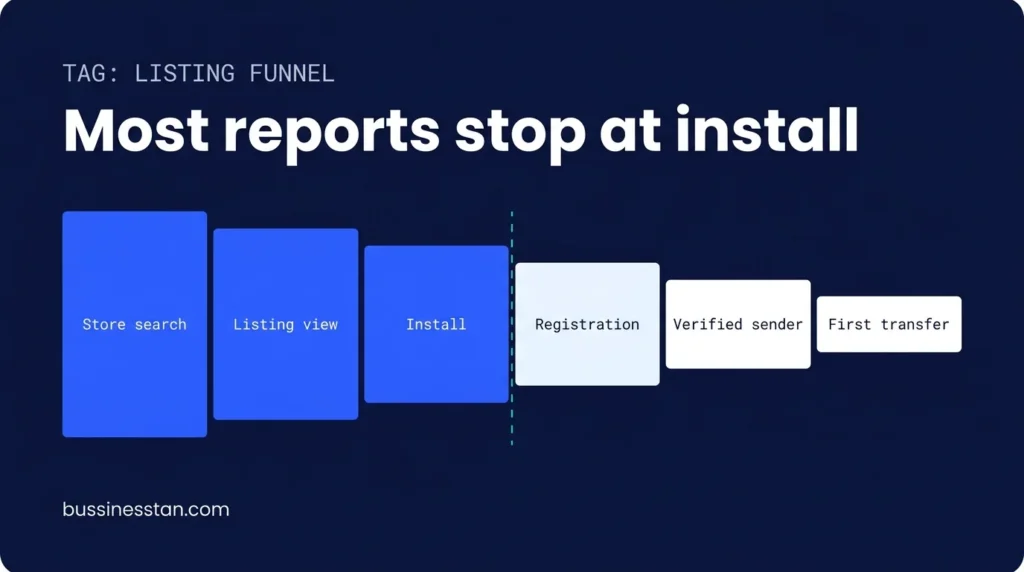
A listing sits in the middle of a funnel that runs: store search, listing view, install, registration, verification, first transfer. Most ASO reporting stops at step 3. A remittance business earns nothing until step 6.
| Funnel step | Metric to watch | Where it lives | Who usually owns it |
|---|---|---|---|
| Store search | Keyword visibility, impressions | App Store Connect, Play Console | Growth |
| Listing view | Product page views | Store consoles | Growth |
| Install | Install conversion rate | Store consoles, MMP | Growth |
| Registration | Install to registration | Product analytics, MMP | Product |
| Verification | Registration to verified sender | KYC provider, analytics | Product and ops |
| First transfer | Verified to funded first transfer | Transfer records | Finance and growth |
The reason this matters is simple. A listing that promises something the app does not do, or hides fees, will raise install conversion and lower verification and first-send rates. Our earlier piece, your cost per install is lying to you, makes the same case for paid acquisition. The listing is where that lie often starts.
Metadata: title, subtitle and the keyword field
Metadata tells the store what your app is for. For remittance, that means brand plus the category term plus, where space allows, the corridor or payout method that carries the most demand.
What each store gives you
| Field | Apple App Store | Google Play |
|---|---|---|
| App name or title | Up to 30 characters | Up to 30 characters |
| Subtitle or short description | Subtitle, up to 30 characters | Short description, up to 80 characters |
| Keywords | Keyword field, 100 bytes, comma separated | No keyword field; terms read from title and descriptions |
| Long description | 4,000 characters | Full description, 4,000 characters |
| Promotional text | 170 characters, editable without a release | Not applicable |
Limits are as published by Apple and Google at the time of writing. Check the current consoles before you ship.
How to fill them for a remittance app
- Title: brand plus "Send Money" or "Money Transfer". Adding a corridor ("to Nigeria") only makes sense if one corridor carries most of your volume.
- Subtitle (Apple): the payout promise you can evidence, such as bank deposit, mobile wallet and cash pickup. Avoid "cheapest" or "instant" unless you can substantiate them in every market the listing serves.
- Keyword field (Apple): receive-country names, currency codes, payout method terms and the local words senders use. Do not repeat words already in the title. Separate with commas, no spaces.
- Short description (Google Play): one plain sentence on what the sender can do and where.
- Long description: fees and rate display, supported corridors, verification requirements and support channels. Senders who read this far are close to installing.
Research terms per store, per send market. "Send money to Ghana" in the UK store and "send money to India" in the UAE store are different jobs.
Screenshots that answer fee, speed and payout
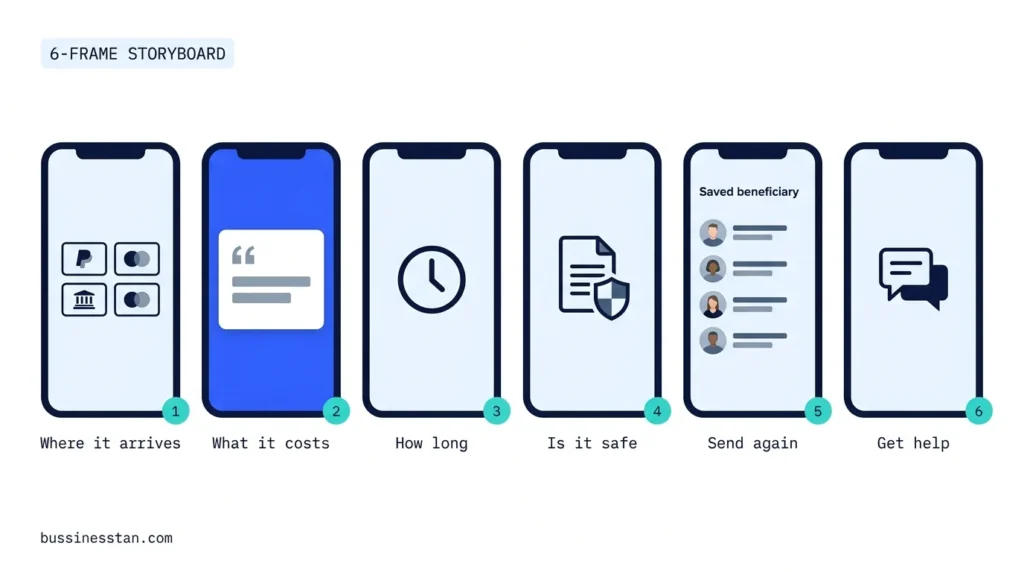
Most money transfer apps show their UI. Senders want answers. App store screenshots for fintech should work as a 6-frame argument, readable in the search results where only the first frames show.
The 6-frame storyboard
| Frame | Question it answers | What to show |
|---|---|---|
| 1 | Where can I send, and how does it arrive? | Corridor and payout methods in one line |
| 2 | What will it cost? | A quote screen with fee and rate shown separately |
| 3 | How long will it take? | Delivery time range with its condition |
| 4 | Is it safe? | Verification steps and how data is protected, stated factually |
| 5 | Will it be easy next time? | Saved beneficiaries and repeat send |
| 6 | Can I get help? | Support channels and transfer tracking |
App store screenshots fintech teams get wrong
The usual mistakes are empty UI screens, text too small to read in search results, and numbers that are not true for the market. Every number on a screenshot needs to hold for the market the listing serves. A fee shown on a UK listing that only applies to one corridor is a claim your compliance team will need to sign off, with its conditions.
Localisation by receive country, and custom pages
One listing worldwide is the default and usually the weakest option. A sender in Dubai sending to Pakistan and a sender in London sending to Ghana want different first frames.
Localisation means more than translation. It means the corridor, payout methods, currency and language that match each send market, and screenshots that show the receive country the sender cares about.
Both stores now let you go further:
- Apple custom product pages: up to 70 additional versions of your product page, varying screenshots, promotional text and app previews. They can be linked from campaigns and can be assigned keywords to appear in search.
- Google Play custom store listings: up to 50, targetable by country or region, search keywords, user state and other audiences, with their own name, icon, descriptions and graphics.
Build them only where there is genuine corridor demand and a campaign or search term to send traffic to them.
This is where store work meets paid media. Our app install and user acquisition team maps each campaign to the page it should land on, so the promise in the ad and the promise in the listing match.
Ratings and reviews without incentives
App reviews for fintech carry more weight than in most categories because trust is the purchase. Senders read the 1-star reviews first, and most of them say the same things: verification took too long, a transfer was delayed, support did not reply.
Both stores prohibit manipulation. Apple's guidelines warn against paid, incentivised, filtered or fake feedback and say apps must not force users to rate the app to access features. Google Play's policy prohibits offering rewards or incentives for ratings or reviews. So the method is timing and response, not rewards.
- Ask at the right moment: after a transfer is confirmed as paid out, using the store's native prompt, not after registration or during KYC.
- Reply to every critical review within an agreed window, with a route to support that does not ask for personal data in public.
- Never promise outcomes in replies such as "your transfer will arrive today" unless the system confirms it.
App reviews fintech teams should send to product
Tag review themes monthly: verification, delay, fees, app stability, support. Send verification and delay themes to product and ops with volumes attached. A reply calms one sender. Fixing the verification queue changes the next 100 reviews.
Review replies and listing copy are advertising. Licensing and AML questions go to a qualified adviser. We handle advertising and marketing compliance.
App store optimization for fintech apps, measured past the install
The listing-to-first-transfer method is the 6-step process our app store optimisation team runs. Each step has an output you can check.
- Read the stores (weeks 1 to 2). Keyword visibility per send market, 3 competitor listings, review themes. Output: an ASO keyword set per store.
- Wire the measurement. Connect store console data to your MMP and transfer records so installs can be followed to verified sender and first transfer by corridor. Output: a funnel report by listing.
- Write the listing (weeks 3 to 4). Title, subtitle, keyword field, descriptions, promotional text. Output: a store metadata pack with claims approved.
- Rebuild the frames (weeks 5 to 6). The 6-frame storyboard, per priority market. Output: screenshot files and preview video brief.
- Test and localise. Store listing experiments where available, then custom pages for corridors with demand. Output: a listing test log.
- Work the reviews (monthly). Prompt timing, replies, theme tagging. Output: a review insight log shared with product.
Store rankings usually take weeks to settle after a change, so compare cohorts over a full month rather than day by day. Report keywords that produce installs but no verified senders, and drop them. If the listing is fine and senders still stall at KYC, the fix is inside the app, which is the work of our app conversion redesign team. For the economics behind this, see why blended CAC misleads.
Frequently asked questions
What is ASO for remittance apps, and how is it different from general ASO?
ASO for remittance apps uses the same store fields as any app, but it is judged on verified senders and funded first transfers by corridor. Keywords are researched per send market and receive country, screenshots answer fee, speed and payout questions, and every claim must hold up for the market the listing serves. General ASO usually stops at installs.
What should a money transfer app store listing include?
A title with brand and category term, a subtitle or short description naming payout methods, corridor and currency terms in the keyword field, a long description covering fees, corridors, verification and support, and 6 screenshots that answer the sender's main questions in order. Add localised versions for your priority send markets.
What makes good app store screenshots for fintech?
Screenshots that answer questions rather than show empty screens. Lead with where you send and how money arrives, then cost, then speed, then safety. Keep text large enough to read in search results, show fee and rate separately, and make sure every number is true for the market. Test the first 3 frames first, because they do most of the work.
How should we handle app reviews in fintech without breaking store rules?
Ask for ratings with the native prompt after a transfer is paid out, never with rewards or as a condition for using a feature. Reply to critical reviews quickly and route people to support privately. Tag themes monthly and share verification and delay complaints with product, because fixing those raises ratings more than any reply can.
How long does app store optimization for fintech apps take to show results?
Research and a listing rewrite usually take 4 to 6 weeks, and the rewrite ships with your next release or through promotional text. Store rankings typically need weeks to settle after that. Judge changes on a full month of cohort data, followed through to verification and first transfer, and expect corridor-level differences.
Where to start
Start with the keyword field and the first 3 screenshots. They are the cheapest fields to change and they shape both search visibility and what installers expect. Then connect your listing data to verified senders and first transfers, so the next change is judged on money, not installs.
If you want the listing, the campaigns and the funnel looked at together, Book a Growth Audit. It takes 2 weeks for a fixed fee, and you keep the roadmap whether or not we work together.

Written by
Founder & CEO, Bussinesstan
Owns the commercial side of every engagement: fixed-fee scoping, corridor economics, and the reporting that ties spend to completed first transfers rather than to installs.
Meet the team
Local SEO for exchange houses: branches, agents and corridors
Local SEO for exchange houses, explained: location pages, a locator that ranks, Business Profiles and reviews, measured on calls, directions and transfers.
Generative engine optimization for fintech: getting named when senders ask AI
Generative engine optimization for money transfer brands: how assistants pick sources, the entity fact sheet, answer-ready pages and honest monitoring.
CRM for money transfer companies: design the data model first
CRM for money transfer companies, built on the data model: one record per sender, 9 lifecycle stages, B2B pipelines, consent rules and a 10-week rollout.