

AI & Automation 9 min read
CRM for money transfer companies: design the data model first
CRM for money transfer companies, built on the data model: one record per sender, 9 lifecycle stages, B2B pipelines, consent rules and a 10-week rollout.
On this page
Quick answer
A CRM for money transfer companies is a single system of record for senders, agents and partners that knows each person's lifecycle stage, corridor and transfer history. It works when the data model is designed before the platform is chosen: one record per person, stages written by the transfer system, only justified fields, consent per channel, and integrations that keep sensitive financial data out.
Key takeaways
- Design the data model first; the choice between HubSpot, Salesforce or anything else comes after.
- Lifecycle stages should be set by the transfer platform, never typed in by hand.
- A field earns a place only if a team acts on it, there is a justified basis to hold it, and it stays current automatically.
- Agents, payroll clients and payout partners need their own pipelines, separate from senders.
- A full rollout typically runs about 10 weeks from scope to live, with migration adding time.
"Our CRM does not know who has sent money." If that sentence sounds familiar, you are not alone. Marketing holds an email list, support holds the helpdesk, product holds the transfer database, and none of them agree. The result is a reactivation email sent to a sender who transferred yesterday, and a welcome offer sent to someone who left in spring.
A CRM for money transfer companies fixes that only if it is built as a data model before it is installed as a tool. Most failed implementations did it the other way round: platform first, fields added as teams asked, and a sync that copied everything the transfer system held.
This guide sets out the model we would design for a remittance CRM, the stages, the fields, the B2B pipelines, the consent rules, and a 10-week rollout.
Why a CRM for money transfer companies starts with the data model
A remittance business earns on the first transfer, then send frequency, then corridor mix. A CRM that cannot see those 3 things is a mailing tool with a licence fee.
| Before | After |
|---|---|
| 3 lists, no single truth | 1 record per person |
| Everything copied in from the platform | Only fields that earn a place |
| Campaigns that end at the click | Campaigns joined to first and repeat transfers |
| Agent leads in a spreadsheet | A pipeline with named stages and owners |
What does "one record per person" mean in a remittance CRM?
It means one identity key, taken from your transfer platform's sender ID, not from the email address. Agent-led senders often have a phone number and no email at all. Merge rules decide what happens when the same person registers twice, or signs up in the app after sending at an agent counter. Write those rules down before any data moves.
Customer lifecycle stages for a remittance CRM
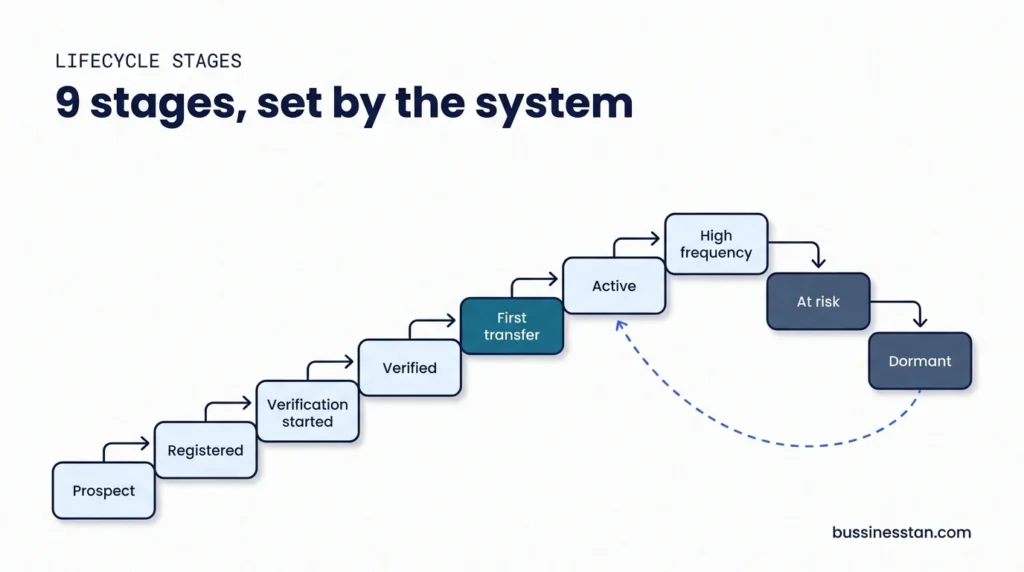
Customer lifecycle stages are the spine of the model. Each stage has an entry rule the transfer system can evaluate, so nobody updates it by hand.
| # | Stage | Entry rule (set by the system) | Main job for marketing |
|---|---|---|---|
| 1 | Prospect | Known contact, no account | Get the registration |
| 2 | Registered | Account created | Start verification |
| 3 | Verification started | First KYC step submitted | Finish verification |
| 4 | Verified | KYC passed | Get the first transfer |
| 5 | First-transfer sender | 1 completed transfer | Get the second transfer |
| 6 | Active sender | Repeat transfer inside their usual cycle | Keep the cycle |
| 7 | High-frequency sender | Sends well above their corridor's typical rhythm | Protect and refer |
| 8 | At risk | Missed their usual sending window | Win back the next send |
| 9 | Dormant | No transfer for a set period | Reactivate or suppress |
A "Reactivated" flag sits on top of stages 6 to 9, so you can see who came back and from which campaign.
One rule carries the whole table. The verification state qualifies as CRM data. The identity document does not.
The fields that earn a place: transfer and corridor data
Most CRMs fail on fields, not features. Teams ask for everything, the sync copies everything, and within a year nobody trusts any of it.
The earn-a-place test
Every proposed field answers 3 questions before it is created:
- Does a named team act on it? If nobody segments, routes or reports on it, it stays out.
- Is there a justified business, legal and security basis to hold it? Sensitive transfer data enters the CRM only where that basis exists and your data-protection owner agrees.
- Can it stay current without manual entry? If it depends on someone typing, it will be wrong by next quarter.
| Field group | Examples that usually pass | Examples that usually stay out |
|---|---|---|
| Identity and consent | Sender ID, phone, email, language, consent per channel | Identity documents, selfies |
| Lifecycle | Stage, stage date, reactivated flag | Manual notes on verification outcomes |
| Corridor | Send country, receive country, primary corridor, payout method preference | Beneficiary bank details |
| Transfer summary | First transfer date, last transfer date, transfers in the last 90 days, value band | Individual transfer amounts, card or account numbers |
| Acquisition | Source, campaign, referral code | Raw ad click logs |
| Support | Open tickets, last "where is my money" contact | Screening results, case notes from compliance |
Licensing and AML questions go to a qualified adviser. We handle advertising and marketing compliance.
B2B pipelines: agents, payroll clients and partners
A remittance CRM holds more than senders. Agent-led operators recruit agents. Payout platforms sell to payroll firms. Everyone manages payout and API partners. Each needs its own pipeline, owned by a named person.
| Pipeline | Stages | Typical owner |
|---|---|---|
| Agent recruitment | Lead, qualified, discovery, proposal, review, won or lost | Agent network manager |
| B2B and payroll clients | Lead, qualified, discovery, proposal, review, won or lost, onboarding | Head of partnerships |
| Payout and API partners | Identified, in discussion, due diligence, contracted, live | Operations lead |
Agents should be company records with branch codes, linked to the senders who first sent at their counter. That link is what lets an agent-led operator see which branches bring senders who later move to the app.
HubSpot for fintech or Salesforce: which fits?
Both can run this model. The choice depends on who will administer it, how complex the B2B side is, and what the rest of your stack already uses. A small team with mostly sender marketing often finds HubSpot for fintech use easier to run. A larger operator with several partner pipelines and in-house admins may prefer Salesforce. Neither decision matters as much as the model you load into it.
Consent, sensitive data and integrations
Consent is held per channel: email, SMS, WhatsApp and push. Transfer status messages follow the system state and are not marketing, but promotional messages sit behind consent and frequency caps.
| System | What flows into the CRM | What never flows | Direction |
|---|---|---|---|
| Transfer platform or RMS | Lifecycle state changes, transfer summary fields | Documents, screening outcomes, full transfer records | Platform to CRM |
| App and MMP | Install source, app events by name | Device identifiers beyond what consent allows | App to CRM |
| Website forms | Registrations, B2B enquiries | Nothing sensitive is collected here | Site to CRM |
| Helpdesk | Ticket counts, contact reasons | Case notes from compliance | Both ways |
| Email, SMS and WhatsApp tools | Sends, opens, replies, opt-outs | Transfer amounts in message bodies | Both ways |
| Ad platforms | Consented audiences only | Transfer values, verification details | CRM to platform |
Once stages are reliable, the messages follow them. Our SMS and email automation work runs on exactly these states, and our guide to activation emails for verified senders who never sent shows the stage 4 flow in detail. For the maths behind stages 5 to 8, read send frequency, not signups.
The handoffs around the CRM, such as agent approvals or B2B onboarding steps, belong in workflow automation, with compliance decisions left to your people.
Dashboards and a 10-week rollout
What "CRM implementation fintech" guides usually miss
Generic "CRM implementation fintech" advice starts with the platform demo. A money transfer operator should start with the questions the board asks: how many verified senders never sent, which corridor holds its senders, and what share of first transfers each campaign produced.
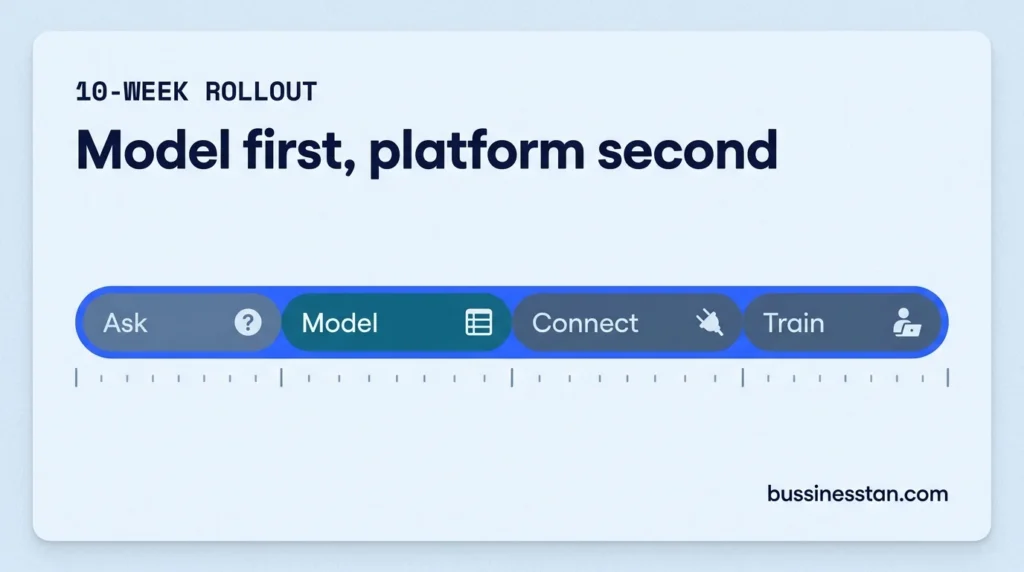
| Weeks | Phase | Output |
|---|---|---|
| 1 to 2 | Ask the questions | Requirements, users, data-protection owner named |
| 3 to 5 | Build the model | Objects, fields, stages, merge rules, pipelines |
| 6 to 8 | Connect the rest | Platform, app, site, helpdesk and messaging integrations |
| 9 to 10 | Train the team | Dashboards, SOPs, handover |
Migration from an old system adds time, so scope it separately.
Dashboards worth building on day one:
- Lifecycle progression by corridor
- KYC recovery and first-transfer activation
- Reactivation from at risk and dormant
- Data quality: duplicate rate and field completeness
- Attribution coverage: the share of first transfers traced to a campaign
This is the work our CRM implementation team does: the model first, then the platform, then the integrations. The support side connects to the same record, which is where AI customer support for where-is-my-money questions draws its context.
Frequently asked questions
What is a remittance CRM?
A remittance CRM is a sender database built around sending behaviour. It holds one record per sender with their lifecycle stage, corridor and transfer summary, plus separate pipelines for agents, B2B clients and partners. It differs from a generic CRM because stages come from the transfer platform, not from sales activity.
Should transfer amounts go into the CRM?
Usually not at the individual level. Value bands and counts over a period support segmentation without copying sensitive financial records. Hold anything more detailed only where there is a justified business, legal and security basis, agreed with your data-protection owner.
Is HubSpot for fintech a good fit for a money transfer operator?
It can be, especially for smaller teams focused on sender lifecycle marketing. Salesforce suits operators with several partner pipelines and in-house administrators. Decide the data model first; both platforms can hold it, and switching tools does not fix a missing model.
How long does CRM implementation take for a money transfer company?
Around 10 weeks from scope to live for a full build: 2 weeks of requirements, 3 weeks of modelling, 3 weeks of integration and 2 weeks of training. Designing the data model alone takes about 4 weeks. Migrating from an existing system adds time on top.
What customer lifecycle stages should a remittance app track?
Nine is a workable set: prospect, registered, verification started, verified, first-transfer sender, active sender, high-frequency sender, at risk and dormant, with a reactivated flag on top. Each needs an entry rule your transfer system can evaluate automatically.
Where to start
Write the 9 stages and their entry rules on one page. List the fields each team says it needs, then run the earn-a-place test on every one. If the result fits on 2 pages, you have a model worth building.
When you are ready to build it, see how our CRM implementation work runs. If you are not sure the CRM is the real leak, Book a Growth Audit: 14 days, a fixed fee, and a tracking map you keep either way.

Written by
Founder & CEO, Bussinesstan
Owns the commercial side of every engagement: fixed-fee scoping, corridor economics, and the reporting that ties spend to completed first transfers rather than to installs.
Meet the team
AI customer support for fintech: automating where-is-my-money safely at MTOs
AI customer support for fintech, applied to money transfer: ticket classes, login before status, live rate reads, escalation and what AI must never decide.
WhatsApp Business API for money transfer operators: a practical guide
A practical guide to the WhatsApp Business API for money transfer operators: opt-in, template approval, 6 remittance flows and when to hand over to a person.
UGC for financial services: creator marketing for money transfer brands without compliance risk
UGC for financial services, done safely: diaspora creators, 6 restricted claim areas, disclosure by market and a brief compliance can sign off.